Terraria MOD APK Latest – Best Adventure Game
505 Games SrlUpdated
DailySize
202 MBVersion
v1.4.5.8.6Requirements
Android 5+Downloads
50000+Get it on

Description
Terraria MOD APK is a search term used by Android players looking for a modified version of the popular sandbox adventure game. Terraria combines exploration, crafting, building, combat, and survival in a world where players can dig underground, collect materials, create equipment, and discover hidden locations. Every journey can feel different because the world offers many ways to explore and build.
If you enjoy games that give you freedom instead of forcing you to follow one fixed path, Terraria can be an interesting choice. You can build a small shelter, search for valuable resources, fight dangerous enemies, and gradually improve your character. However, MOD APK files may differ from the official release, so it is important to understand their features, compatibility, and possible risks before installing one on your Android device.
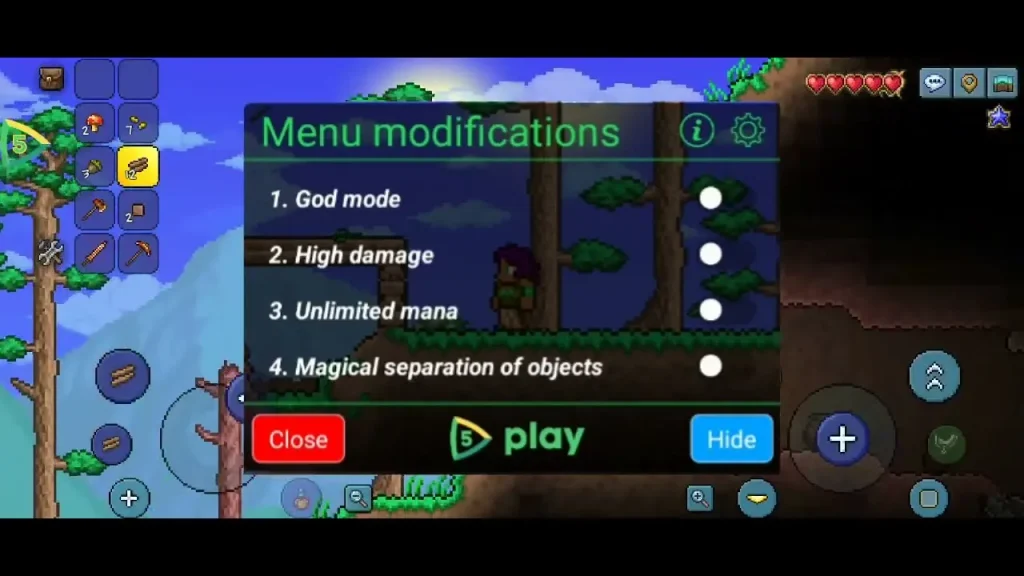
What Is Terraria MOD APK?
Terraria is a 2D sandbox game that lets players explore large environments, mine blocks, craft tools, build structures, and fight enemies. Unlike games that offer only a fixed set of missions, Terraria gives players considerable freedom to decide how they want to play. You can focus on construction, collect rare materials, explore underground caves, or prepare for challenging boss battles.
Terraria MOD APK generally refers to an Android installation package that has been modified by a third party. Depending on the specific file, it may claim to offer changes to gameplay, resources, or other features. These changes are not guaranteed to be included in every version, and unofficial files are not the same as updates released by the original developer. Always check what a particular version actually contains before downloading it. Discover more exciting Android games with our latest guides, including Stick War Legacy MOD APK, featuring adventure, crafting, building, and exploration.
What’s New in the Latest Version of Terraria?
The changes available in Terraria depend on whether you are using the official game or a third-party modified package. Official updates may introduce new content, improve existing gameplay systems, and fix technical issues. A modified APK may be based on an older release, even if its download page describes it as the latest version.
Before choosing a Terraria MOD APK, check these points:
- Version information: Confirm the version number and compare it with the official release.
- Gameplay improvements: Look for clearly documented changes rather than relying on promotional claims.
- Bug fixes: Check whether known crashes, loading problems, or control issues have been addressed.
- Android compatibility: Make sure the package supports your device and Android version.
- File details: Review the file size, package information, and source before installation.
Main Features That Make Terraria Interesting
Terraria stands out because it mixes creative building with action-packed exploration. Players can start with basic equipment and slowly develop their character by collecting materials, crafting better tools, and discovering new areas. These features give the game plenty of variety without requiring players to follow one strict playing style.
1. Open-World Exploration
Travel across forests, deserts, underground tunnels, and other environments. Each area can contain different resources, enemies, and hidden discoveries.
2. Crafting and Resource Collection
Gather wood, stone, ores, and other materials to create tools, weapons, armor, furniture, and useful equipment.
3. Creative Building
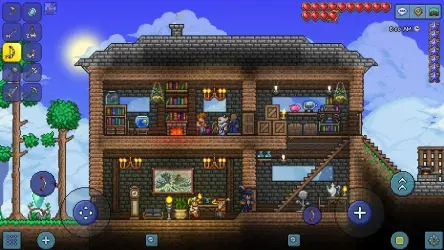
Construct houses, underground bases, storage rooms, and larger structures. You can change the environment and design your own world.
4. Combat and Boss Battles
Fight different enemies and prepare for stronger bosses as you progress. Better weapons, armor, and accessories can help you survive difficult encounters.
5. Treasure Hunting
Search caves, explore dangerous locations, and discover chests containing useful items. Careful exploration can help you find equipment for future challenges.
Additional Gameplay Features
Besides its main activities, Terraria includes several systems that make long-term progression more interesting.
- Character customization: Change your character’s appearance and use different armor and accessories.
- Equipment progression: Find or craft stronger weapons and protective gear as challenges become harder.
- NPC interactions: Build suitable housing to attract different non-player characters who provide useful services.
- World exploration: Discover different biomes, underground areas, and special locations.
- Inventory management: Organize resources and keep important tools ready for building, mining, and combat.
- Multiplayer options: Play with other people when supported by the game version, device, and network setup.
- World customization: Create new worlds and experiment with different exploration and building strategies.
The exact content available can depend on the installed version. Modified packages may also remove, change, or break features that work in the official release.
Exploring, Building, Crafting, and Survival
Terraria offers several connected activities, and each one supports the others. Exploring helps you collect resources, crafting turns those resources into useful equipment, and building gives you a place to store items and prepare for future adventures.
Exploration and Mining
Start by exploring the surface and looking for trees, stones, and other basic materials. Once you have suitable equipment, travel underground to search for ores, treasure chests, and rare resources. Take enough supplies before entering dangerous areas because enemies and environmental hazards can make returning difficult.
Building and Crafting
Build a simple shelter before attempting longer adventures. Add walls, lighting, furniture, and storage to make your base more useful. As you collect additional materials, you can craft better tools and weapons. A well-organized base also makes it easier to manage equipment between battles.
Combat and Survival
Enemies become more challenging as you explore new areas and progress through the game. Prepare by upgrading your armor, carrying suitable weapons, and learning enemy attack patterns. Boss battles often require extra preparation, so it is helpful to collect supplies and choose an appropriate arena before starting a fight.
Terraria MOD APK vs Official Version
| Feature | Official Terraria | Terraria MOD APK |
| Source | Official app store | Usually a third-party source |
| Game content | Based on the official release | Depends on the specific modification |
| Updates | Distributed through supported stores | May require separate files or manual installation |
| Stability | Receives official fixes | May contain bugs or compatibility issues |
| Security | Official distribution provides a clearer source | Depends heavily on file integrity and source |
| Extra modifications | Only features included in the official game | May offer changes, but these need verification |
| Multiplayer | Depends on supported version and setup | Compatibility is not guaranteed |
| Support | Official support channels may help | Third-party modifications may not receive official support |
How to Download and Install Terraria MOD APK on Android
If you want to play Terraria on Android, the safest option is to obtain the game through a supported app store. The publisher’s support page identifies Google Play and other official storefronts as download options.
For the official version, follow these steps:
- Open Google Play Store on your Android device.
- Search for Terraria and check the publisher information.
- Review the app details and device compatibility.
- Purchase the game if required, then tap Install.
- Wait for the installation to finish.
- Open the game and check that it loads correctly.
- Start a new world or load your existing character.
If you are considering an unofficial Terraria MOD APK file, take additional precautions:
- Check the source and read independent reports about the file.
- Review the requested permissions. A game should not need unrelated access to sensitive information.
- Scan the file with reputable security software before opening it.
- Avoid installers that request unnecessary permissions or ask you to disable device protection.
- Back up your existing game data before testing any different build.
- Do not enter passwords or payment details on unrelated download pages.
These checks reduce some risks but cannot guarantee that an APK is safe. If a file cannot be verified, do not install it.
How to Update the Game Without Losing Progress
Updating a game without a backup can put your saved characters and worlds at risk, especially when switching between different versions or installation sources.
Follow these precautions:
- Back up your progress: Preserve available character and world saves before changing the installation.
- Check the version number: Make sure the update is compatible with your existing game.
- Use the same trusted source: Official store updates are preferable to unrelated installation packages.
- Avoid uninstalling immediately: Removing an app can delete locally stored data, depending on the device and storage arrangement.
- Test after updating: Open the game and verify that your characters, worlds, and inventory are still available.
- Keep a backup copy: Store important saves somewhere safe before making further changes.
Common Terraria MOD APK Problems and Their Solutions
Players may experience installation errors, crashes, black screens, or missing saved data when using incompatible or modified game files. The following troubleshooting steps can help identify common causes.
| Problem | Possible solution |
| App does not install | Check available storage, Android compatibility, and whether the file is complete. |
| Game crashes on startup | Restart the device and check for an incompatible or damaged installation. |
| Black screen appears | Close the game, restart the device, and try a supported version. |
| Game runs slowly | Close unnecessary background apps and lower available graphics settings. |
| Saved world is missing | Check the correct game profile and available backups before changing or deleting files. |
| Update fails | Verify the version and installation source; check for signature conflicts. |
| Multiplayer does not connect | Check the network, game version, and compatibility between players. |
| Installation requests unusual permissions | Stop the installation and review the file’s source and permission requests. |
My Personal Experience with Terraria MOD APK
Terraria’s strongest point is the freedom it gives players to decide what to do next. Someone who enjoys construction can spend hours designing a base, while an action-focused player can concentrate on weapons, armor, and boss fights. This variety makes the gameplay appealing to people with different interests.
When evaluating Terraria MOD APK, I would pay particular attention to whether the game launches correctly, whether controls respond properly, and whether saved worlds remain intact. A modification that advertises extra resources is of limited value if it causes frequent crashes or damages existing progress.
I would also compare the advertised features with what is actually available after installation. Since third-party files can differ, these points should be checked in the specific version rather than treated as a guarantee that every MOD APK works in the same way.
Why Players Visit Our Website for MOD APK Guides
Players often need more than a download page when looking for an Android game. They may want to understand the gameplay, check device requirements, compare official and modified versions, or find solutions to installation problems.
Our website, Apkmindtech, can help readers by providing organized game guides and practical information in straightforward English. Before publishing a MOD APK listing, it is important to explain what is verified, identify the version being discussed, and avoid promising features that have not been tested.
We aim to make game information easier to understand by covering:
- Game introductions and important features.
- Android installation and compatibility guidance.
- Differences between official and modified releases.
- Common technical problems and possible solutions.
- Backup, privacy, and device-security precautions.
Readers should always check the available details carefully and use a trusted source when installing games.
Pros and Cons of Terraria MOD APK
Before choosing a modified version, consider both its possible benefits and its limitations.
Pros
- May provide gameplay changes if the specific modification supports them.
- Can be interesting for players who want to explore altered game mechanics.
- Offers an alternative version for comparison with the original game.
- May appeal to experienced players who understand the risks of unofficial builds.
Cons
- Advertised modifications may be missing or misleading.
- Unknown files can contain security risks.
- Installation may fail because of Android or signature incompatibility.
- Updates and multiplayer compatibility may be unreliable.
- Existing characters or worlds may be lost or damaged.
- Official technical support may not cover problems caused by modified files.
Security and Privacy Tips: Keep Your Android Device Safe
Installing APK files from unknown sources requires extra care. A file can look like a normal game installer while containing unwanted code or requesting unnecessary access to your device.
Use these precautions before installing Terraria MOD APK:
- Download only from sources you have a good reason to trust.
- Keep Android and your device’s security updates current.
- Review app permissions before granting access.
- Avoid installers that request contacts, SMS, or other unrelated permissions.
- Do not disable security protections simply because a download page tells you to.
- Back up important files and saved worlds regularly.
- Avoid entering personal information on suspicious websites.
- Remove unfamiliar apps if you discover unexpected behavior, and run a security scan.
Frequently Asked Questions
What is Terraria MOD APK?
It is a term used for an Android APK package that has been modified by a third party. The actual changes depend on the file, and some downloads may not work as advertised.
Is Terraria available on Android?
Yes. The official mobile game is available through supported storefronts, including Google Play. Device requirements can vary with game updates.
Does Terraria MOD APK include unlimited resources?
Not necessarily. Some third-party pages may advertise unlimited resources, but the feature must be verified for the specific build.
Can I play Terraria offline?
Many single-player activities are available without an active internet connection, but online multiplayer and some connected services require a network connection. Availability may vary by version and setup.
Is Terraria suitable for low-end Android phones?
It depends on the device’s hardware, Android version, and the size of the world being played. Check the current requirements and test performance before creating a large world. The publisher provides guidance on mobile compatibility.
Will updating the game delete my progress?
It should not normally be necessary to lose progress during a compatible update, but problems can occur. Back up characters and worlds before changing versions or installation sources.
Can I play multiplayer with a modified version?
It is not guaranteed. Differences in game versions, modified files, or network configuration can prevent players from connecting successfully.
Is Terraria MOD APK safe to install?
Safety depends on the file and its source. Unofficial packages may carry malware, privacy risks, or compatibility problems. The official store is the safer recommended option.
How can I fix Terraria if it keeps crashing?
Restart your device, check storage space, close unnecessary background apps, and confirm that the installed version supports your device. Back up saved data before reinstalling.
Does Terraria support building and crafting?
Yes. Building and crafting are central parts of the original game. Players can collect materials, create equipment, construct shelters, and customize their environments.
Final Thoughts
Terraria combines exploration, crafting, survival, building, and combat in a flexible 2D adventure. Its wide range of activities gives players plenty of reasons to explore new locations, improve equipment, and develop their own worlds. It is a good option for people who enjoy creative games with a mixture of action and long-term progression.
Before downloading Terraria MOD APK, check the exact version, confirm which modifications are actually included, and consider the risks of installing unofficial files. A modified package may not offer every advertised feature and can introduce problems with security, updates, or saved data. For a more dependable experience, choose the official release and keep it updated through a supported store.